
Dynamic Lead FormsEmbedding
URL Prefill
Fill in answers from the page URL before the visitor starts
Add query parameters to a URL and the form opens with those answers already filled in. Use it for campaign links, emails, and ads where you already know who the visitor is.
https://YOUR_WEBSITE.com/demo?<questionId>_<fieldName>=<value>Where It Works
| Where the form lives | Put the parameters on |
|---|---|
| Embedded with the Surface Tag (inline, popup, slideover, widget) | The URL of your page |
Surface form link (forms.withsurface.com/s/<formId>) | The form link |
Your own <iframe> without the Surface Tag | The iframe src |
On a custom form domain, the Surface Tag needs data-custom-domain set, or the parameters never reach the form.
1. Find the Question ID
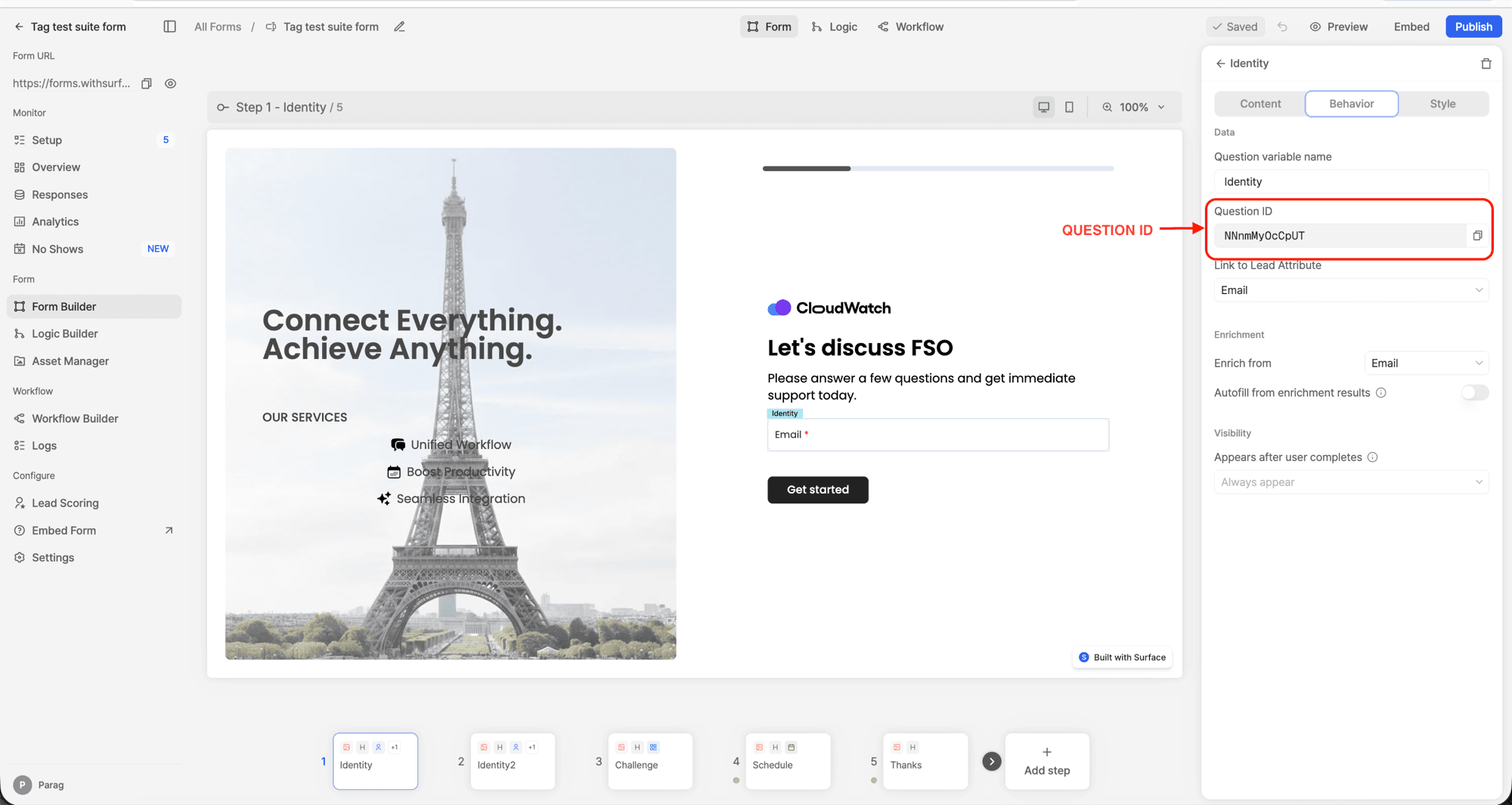
Open the form in the builder, select the question, and open the Behavior tab. Copy the Question ID.
2. Pick the Field Name
The part after the underscore depends on the question type.
| Question type | Parameter | Value |
|---|---|---|
| Contact details | <questionId>_<field> (see below) | Any text |
| Short text | <questionId>_input | Any text |
| Long text | <questionId>_input | Any text |
| Dropdown | <questionId>_selected | Option text, exactly as shown |
| Multi-select dropdown | <questionId>_selected | Option texts, comma separated |
| Multiple options | <questionId>_choices | Option texts, comma separated |
Contact Details Fields
| Field | Field name |
|---|---|
| First name | firstName |
| Last name | lastName |
| Full name | fullName |
emailAddress | |
| Work email | workEmailAddress |
| Phone | phoneNumber |
| Company | companyName |
| Job title | title |
| Website | websiteUrl |
| Company size | numberOfEmployees |
| Company revenue | companyRevenue |
| Street address | streetAddress |
| Apt, suite | aptSuiteEtc |
| City | city |
| State | state |
| Zip code | zipCode |
| Country | country |
3. Build the URL
Join parameters with &. One contact details question can take several fields.
https://YOUR_WEBSITE.com/demo?abc123_firstName=Jane&abc123_emailAddress=jane%40acme.com&def456_selected=United%20StatesReplace abc123 and def456 with your question IDs.
Rules
- Option values must match the option text exactly, including case. Values that match nothing are ignored.
- A comma always separates options, so an option containing a comma cannot be prefilled.
- URL-encode values: space is
%20,@is%40,+is%2B. - An email field that blocks personal emails ignores a personal address from the URL.
url,referrer, andcookiesare reserved parameter names.- Other parameters (
utm_*,gclid) are untouched and still attribute the visit. - Visitors can edit prefilled answers before submitting.
Not Supported
- Single choice questions (pick one buttons).
- Multiple options questions on a Surface form link. They prefill only when embedded with the Surface Tag.
Ready to Get Started?
See it on your own site, or open the app and build the first form.