Cookie Consent for the Surface Tag
Connect your cookie banner to Surface so visitor recognition and cookie tracking follow the visitor's choice.
Connect your existing cookie banner or consent management platform (CMP) using data-consent-mode and window.SurfaceSetConsent(...). Surface does not create a banner.
The tag then waits for cookieTracking: true before visitor recognition, journey tracking, or forwarding page cookies. Forms still render and accept submissions.
1. Enable Consent Mode on Your Tag
Add data-consent-mode to your existing tag in <head>. Install it only once per page.
<script
src="https://cdn.jsdelivr.net/gh/trysurface/scripts@latest/surface_tag.min.js"
site-id="YOUR_SITE_ID"
data-consent-mode>
</script>Find YOUR_SITE_ID in Settings → Overview. Keep any existing custom domain attribute, such as data-custom-domain="forms.example.com", on this script.
Add the attribute before the tag loads. Its presence enables consent mode, even with "false" as its value. Without it, consent answers do not gate the tag's cookie tracking.
2. Connect Your Cookie Banner
Send the current choices on every page load and preference change, including rejection or withdrawal. Your CMP must restore saved choices; Surface does not persist them.
Place this helper after the tag and wire it to your CMP's initialization and change callbacks:
<script>
function updateSurfaceConsent(marketingAccepted, analyticsAccepted, cookiesAccepted) {
window.SurfaceSetConsent({
adTracking: marketingAccepted === true,
surfaceAnalytics: analyticsAccepted === true,
cookieTracking: cookiesAccepted === true
});
}
</script>Map your CMP's categories to these arguments. cookiesAccepted means permission for visitor recognition and cookie tracking, not just essential cookies.
| Property | Controls |
|---|---|
cookieTracking | Tag recognition, journey cookies, lead cache, cookie forwarding, and the form's Cookie Tracking choice. |
surfaceAnalytics | Form analytics and drop-off stats. |
adTracking | Form tracking integrations and conversion pixels. |
Send all three properties every time: each call replaces the previous answer for all forms on the page. Only boolean true grants consent; omitted properties are denied.
From the appropriate banner callbacks:
// All categories accepted:
updateSurfaceConsent(true, true, true);
// All categories rejected or withdrawn:
updateSurfaceConsent(false, false, false);For partial consent, pass each category's actual choice. Dismissing the banner is not a grant.
If Your Tag Loads Asynchronously
For async, defer, tag managers, or framework loaders, retain the Surface-generated consent queue. For custom installations, add it before the tag and banner callbacks:
<script>
window.SurfaceTagQueue = window.SurfaceTagQueue || [];
window.SurfaceSetConsent = window.SurfaceSetConsent || function (consent) {
window.SurfaceTagQueue.push({ type: "consent", args: [consent] });
};
</script>The tag replays queued answers when loaded. Keep data-consent-mode on the external script.
3. Configure Each Form's Privacy Settings
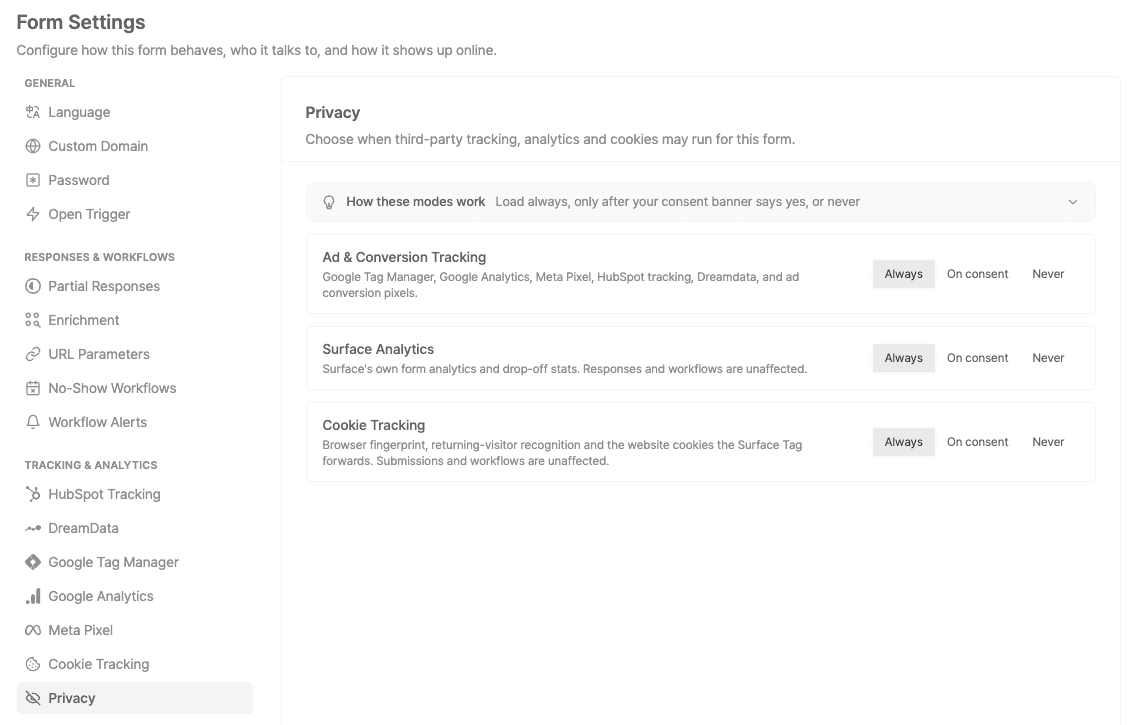
Under Form Settings → Privacy, set Cookie Tracking to On consent. Do the same for Surface Analytics and Ad & Conversion Tracking to make them follow your banner.
| Form Setting | Behavior |
|---|---|
| Always | Runs regardless of consent. |
| On consent | Follows the reported choice; regional defaults apply before an answer. |
| Never | Stays off regardless of consent. |
New forms default Cookie Tracking to On consent, unless explicitly configured (including copied settings). Older forms without a saved setting retain Always. Check each form.
Before the Banner Reports a Choice
On consent form categories wait in the EU, EEA, UK, or when the region is unknown. Elsewhere, they may track until refused. Reported choices override these defaults.
The consent-enabled tag always waits, regardless of region. To make forms wait too, send all-false choices at initialization until your CMP supplies a saved or new grant.
Global Privacy Control (GPC) overrides grants for On consent advertising tracking, not the other categories.
What Happens When Consent Is Withdrawn?
Send the full updated answer. In consent mode, cookieTracking: false stops tag tracking and cookie forwarding, clears journey cookies and cached lead data, and relays choices to forms.
Submissions and workflows still work. Withdrawal cannot undo sent data or unload third-party scripts.
Test Your Setup
Test your published site with a fresh browser session:
- Before accepting: no
surface_journey_idorsurface_recent_visitcookies, orsurfaceLeadDatalocal storage, from the tag. - Accept: journey tracking can start; recognition can start with a form open.
- Withdraw: journey cookies and cached lead data clear; tracking stays off after navigation.
- Reload: saved choices are restored and all three properties resent.
- Submit with tracking denied: the response and workflow still work.
Form iframe requests for rendering and submission are expected even when tracking is denied.
Troubleshooting
- Unexpected tracking: check the attribute, duplicate tags, form Privacy settings, and boolean
cookieTrackingvalue. - API unavailable: check script loading or use the async queue.
- Custom-domain form misses consent: match the form's origin to the tag's verified
data-custom-domain.
Ready to Get Started?
See it on your own site, or open the app and build the first form.