
Artifacts and the Asset Library
Where the durable output of an agent run lives: drafts, the state each one is waiting in, and how images get in and stay reusable.
An artifact is the lasting result of an agent run: something a human can open, review, edit and ship. A draft or an image is an artifact; a chat answer is not.
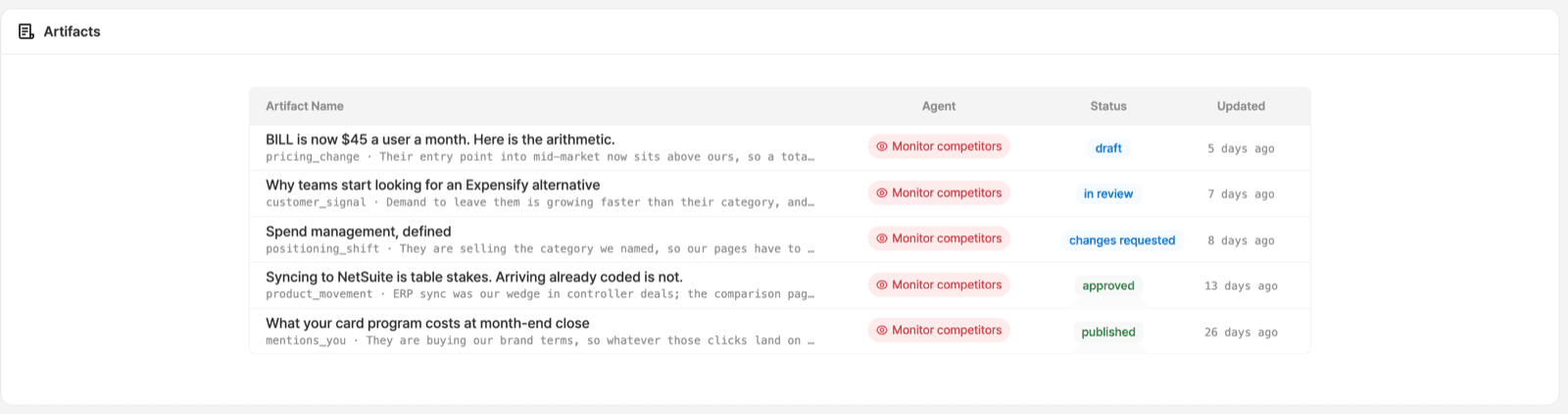
The List
Four columns: Artifact Name, Agent, Status, Updated.
- Agent names the agent that produced the row, so you can trace a piece back to the run behind it.
- Under the title sits the finding that prompted it: the
competitor agent's tag
(
pricing_change,positioning_shift,product_movement,customer_signal,mentions_you) and the one-line reason it mattered. - Status is the review state: draft, in review, changes requested, approved, published. See Review and publish.
The Asset Library
Images and files live in the environment's asset library, not on the entry that
first used them. An entry's image field points at an assetId, so the same
image can be used by several entries without being uploaded again.
Uploading takes three parts: ask for a presigned URL, PUT the bytes, then
confirm. A large file never round-trips through the API. The first and last
parts are MCP tools: cms_create_asset_upload_url
(filename, mimeType, sizeBytes) then cms_confirm_asset_upload.
Set alt when you attach an image. It is far easier than going back for it
later. From Slack: "upload this to the CMS asset library with alt text and set
it on the post".
Finding Them Later
- Filter over MCP.
list_blogstakes astatefilter and asearchterm, which is the quickest way to answer "what is sitting in review". - Cluster them.
assign_blog_clusterassigns or clears a strategy cluster on a piece, so "which campaign was this for" is recorded on the artifact rather than in someone's memory. - Archive rather than delete.
archive_blogis reversible and also unarchives;cms_delete_entrytakes the revision history with it.
Traffic analytics shows what the artifact produced once it was live.
Ready to Get Started?
See it on your own site, or open the app and build the first form.